Test 3 - Checking for Sensible Behaviour and turn back loops.
Tests on the XT1 were carried out a good while back and
documented here.
(Again - right click the mouse if you wish to open in a new window.)
This illustration is exaclty the same test that I am carrying out today, and that first page reveals three of the turn back loops that remain in plotted route to reach the end. At this point, the end was three miles from my current posiiton, but the XT1 was taking me back north - following its trail of breadcrumbs - the turn back loops to get to where it had wanted me to joing the A1 south in the first place. This same route was tested on the XT2 when I got it and similar if not identical behaviour was observed.
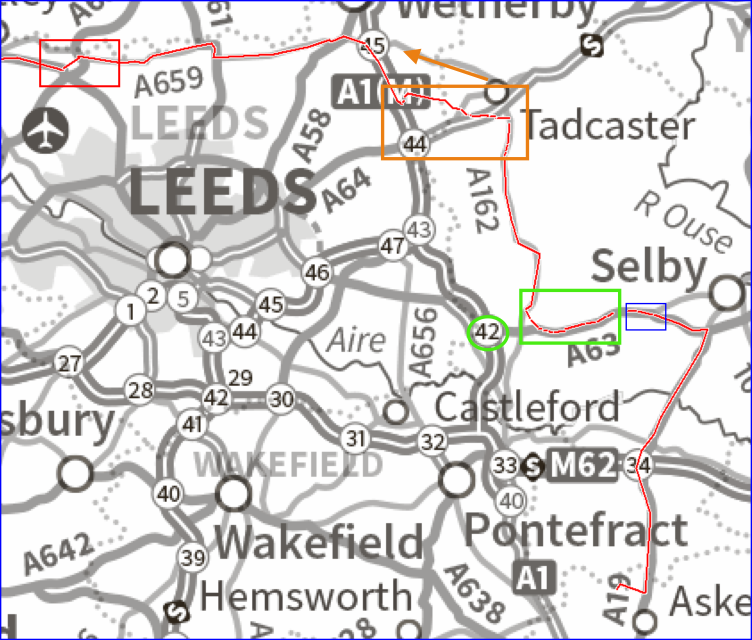
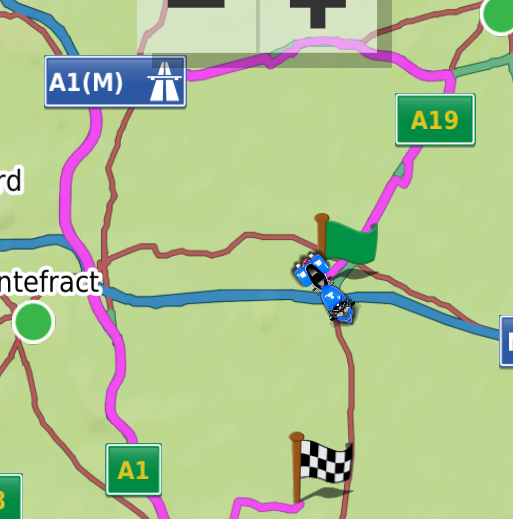
I need to look at the route map again:
- U Turn Map.png (500.54 KiB) Viewed 199 times
There are 4 places where I deviated from the Zumo's plotted route:
Red Rectangle. To avoid busy traffic lights. Broken track log, but the navigation continued ahead - no fuss.
Orange Rectaangle. Many serious attempts to get me to go back. 13 according to the number of broken segements - which sounds about right. But this is not RUT bahaviour. As I drove along it tried different roads to get me to head back to the A1 - initially junction 45, later junction 44. Eventually it decided junction 42 was a better alternative - which is more or less the way that I was heading. Despite the number of U turn requests and take a different road requests - this is NOT RUT Behaviour. The Garmin is Correct, I am not going the faster way, it is updating constantly and at each point finding the faster way from my current position. This is correct behaviour.
Green Rectangle. Almost within reach of Junction 42, Instead, I take the A63 heading East, and it goes bonkers.
Now I know this road from previous tests. If I simulate my position on the A63 anywhere in the green rectangle and aske the XT2 to plot a route to my end location, it will head west to junction 42 to get onto the much faster A1(M). So although it is not the way I want to go, it is the better route given the routing that I have set it to use (ie Faster Time). I was getting repeated requests to either U turn or take a loop back route. Ten of them for the netx 3.5 miles. But again - this is
NOT RUT behaviour. But after the village of Hambleton - where the green box ends - if I set my position East of Hambleton (in the blue box) it will navigate to the east as the faster way.
It gave two more requests to turn back and then less than a mile after leaving Hambleton, it navigated ahead.
Now - although I say it is not RUT behaviour where the Blue box and orange box is drawn, it could have been. It would do the same thing if it was. Exaclty the same. So I stopped at the side of the road and looked at the route that it was plotting to take be back to the A1(M).
It was not heading back to Junction 44, or to Junction 43. It was heading to Junction 42. That isn't RUT behaviour - RUT behaviour would take me back to Junction 42. Some of the turn back requests were not U turns, they were loop back using a side road requests. If this was RUT behaviour, I would be able to see them on the route.
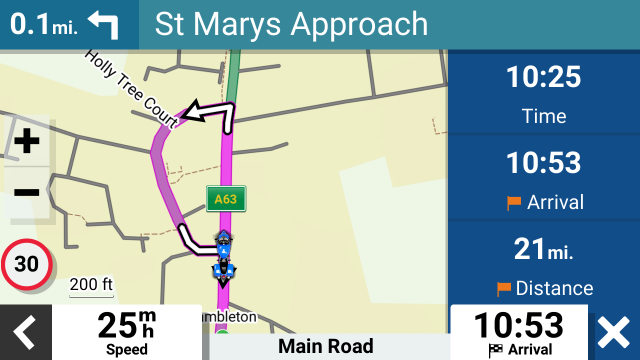
Below is one such turn back loop shown while the satnav is navigating. This is yesterday in the middle of Hambleton.
- XT2 v660 RUT Test 1 - 24.png (110.62 KiB) Viewed 192 times
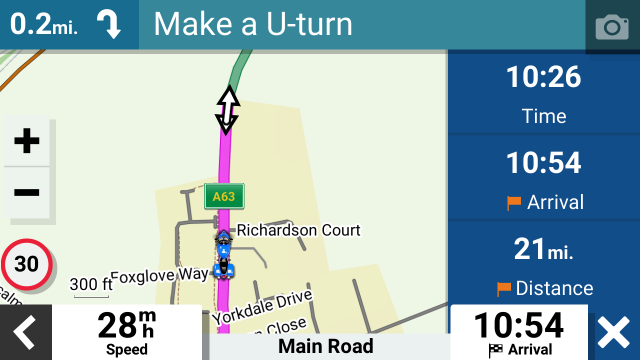
And the screen a short distance later after the route had calculated to the next U turn request.
- XT2 v660 RUT Test 1 - 25.png (79.85 KiB) Viewed 192 times
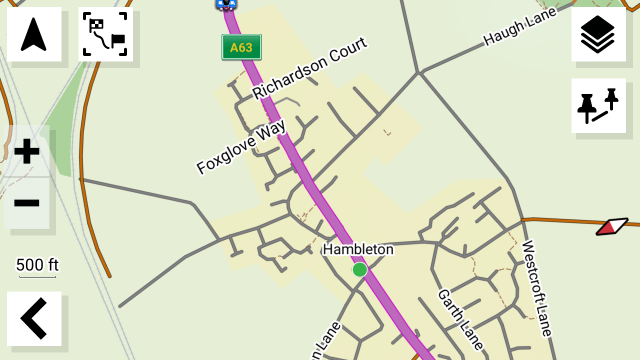
The next image is the preview screen shorly after the previous screen. I stopped and zoomed out as far as I could and still retain the detail. You can see the tail of the motocycle icon on the road above the A63 road marker. You can also see the road where the turnback loop was plotted. The route no longer shows the turnback loop - even though at this stage the route is aiming for a U turn.
- XT2 v660 RUT Test 1 - 26.png (157.46 KiB) Viewed 192 times
The above three are contrary to previous tests where the turnback loops have remained - primarily because the Zumo was calculating only to the point where it last asked me to turn back. It tagged this new short section of route onto its previous route. Which is why it could never escape from RUT behaviour - it wasn't even making an effort to calculate a new route. It was only tagging a bit to get you back to where you were.
This can be seen from a different test taken on the XT1 in December 2022
- XT TurnBack Loops - Preview Screen.png (353.29 KiB) Viewed 192 times
This behaviour has very definitely changed. Although the decision to continue ahead came after the tipping point - in Hambleton where it becomes faster to continue ahead, there were only 2 U turn requests before it navigated ahead - about 1 mile.
This is not ideal, but it is different. Comapared to the XT1 - which when after setting the mImported bit to fool the Zumo into thinking the route was created on the XT1 - that calculated the way ahead as soon as I started riding down the A63 away from the A1. That is 4 miles before where the XT1 indicated the location of the tipping point, and 5 miles before The XT2 v6.60 decided to continue ahead. 5 miles is a long way if you are going in the wrong direction. But I don't have any records of the XT2 following this route with a corrected route from a gpx file.
I need to run this again on my favourite test location - but currently the road is closed for another 7 days. This route has worked well - but there are far to many other variables. eg it was Saturday. It was Bank Holiday weekend. There are too many alternative roads available. My riding style had changed ('cos I was in the car !)
There is something odd about the XT2 offereing a mixture of turn round loops and U turns. I could not establish a pattern. I thought it had given up on U turns at one point, repeatedly asking for turn round loops, then it would throw in a few U turn requests.
I'm suspicious because an early 'fix to the RUT issue was to reduce the number of U turn requests to 2. After that it had to use side roads and housing estates. Curiously - using a roundabout to turn back counts as a U turn, probably because you are going back on the same road ! So If you disable U-turns it will not turn you back using a roundabout !!
It is progress - but Track logs are still broken, route points (seem) to be ignored if you cannot get to them after RUT is triggered by using the skip feature, and on this single test, it did not perform as well as a test I had carried out a while ago on the XT1 on the same test route as an imported gpx file that had its mImported byte changed.
But I don't regard one test as being conclusive.